About this item
- Software Tray Tip – Don’t Panic If the Software Display Doesn’t Show Up: After downloading and installing the customization software, if you double‑click the shortcut and no program window appears – don’t worry! The software is minimize to the system tray (the bottom‑right corner of your Windows taskbar, near the clock). Simply look for the Doohoeek icon there, double‑click it, and the main configuration window will open right up.
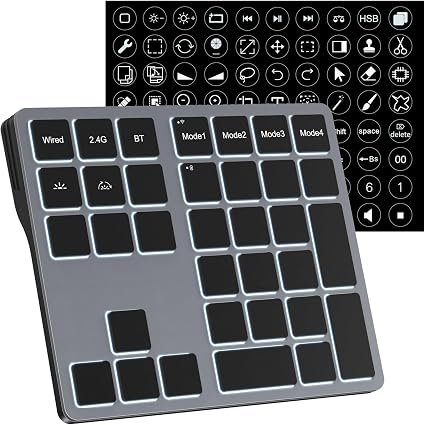
- EXCLUSIVE Windows Compatibility & Tri-Mode Connectivity: This keypad is designed ONLY for Windows devices. Connect to up to 3 devices simultaneously via Bluetooth 5.0, 2.4GHz wireless (dongle included), or wired. Switch between your desktop PC, work laptop, and tablet with a single button press – no re-pairing required.
- 25 Fully Programmable Keys – Turn Complex Actions into One Click: Supercharge your daily workflow by assigning macros, text snippets, or app‑specific shortcuts (e.g., Ctrl+C/V, Alt+Tab, screenshots, undo/redo) to any of the 25 keys using our intuitive configuration software. The included customizable shortcut stickers let you label each key instantly, so you never forget your setup.
- One Pad, Four Virtual Keyboards: Create up to 4 distinct key layouts for different tasks or software, and switch between them instantly using the dedicated mode key. Layer 1 for Premiere Pro editing, Layer 2 for Excel number‑crunching, Layer 3 for gaming commands, and Layer 4 for general web browsing – all stored onboard.
- Dynamic Backlighting with Brightness Control: Never fumble for keys in dimly lit studios, late‑night work sessions, or darkened conference rooms. Enjoy vibrant 7-color backlighting. Use the dedicated backlit keys to easily cycle through colors and adjust brightness levels (high/medium/low) to match your environment.


Reviews
There are no reviews yet.